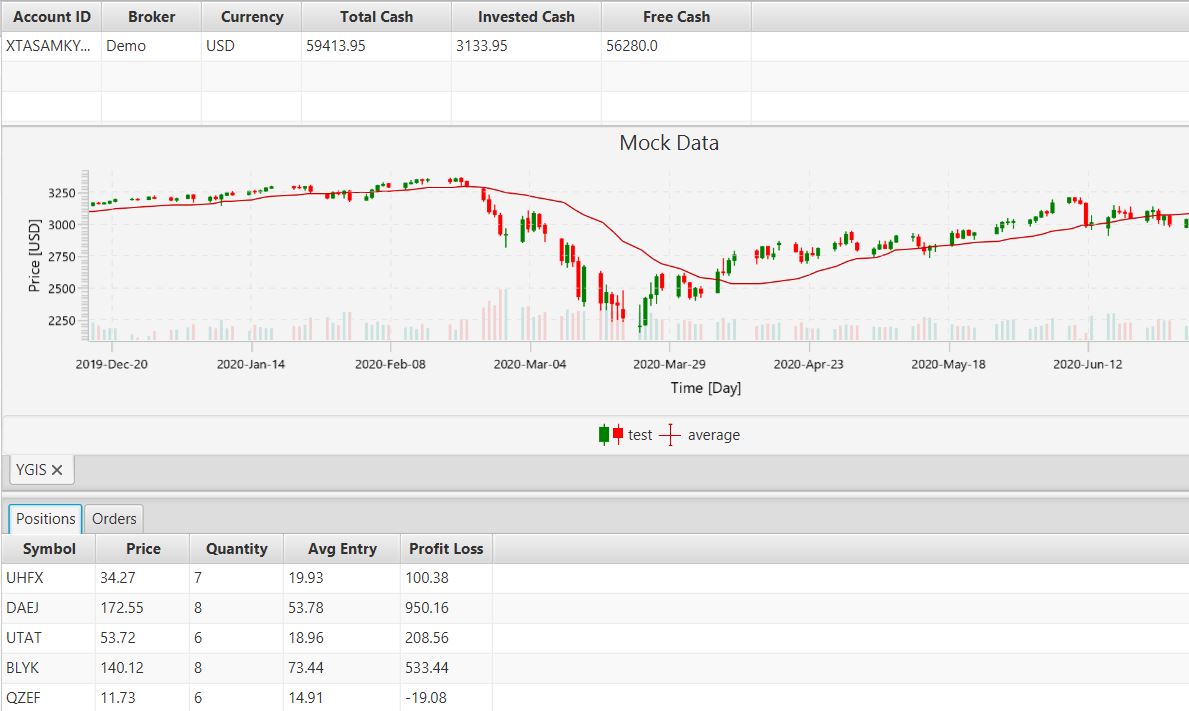
Java Market Trading Client

A market trading app to execute trades via market orders. Connect to your trading API and execute market trades.
Designed this project to build on my workflow and develop skills using industry standard tools.

The project

I wanted to develop my skills using the professional tools that the industry uses to deliver their products. To accomplish that, I simply looked at many job descriptions and noted down what I would have to learn and then incorporate that into a fun project. I decided to build a simple Java-based trading client to execute algorithmic trades. Such Fun!

Project Function and Goals

I was always interested in the fintech industry as it also combined with my love for optimisation. Now I did research and found that Python is the de-facto language for executing algorithmic trades for individuals, but again I wanted to apply professional tools to my development process and upskill myself.
I outlined a plan using a mind map and broke down the project into 5 categories: 
  • Tech Stack
  • Application Flow
  • Data Handling
  • Scalability
  • Goals

I also drew a quick sketch of what I wanted the UI to look like, which helped illustrate the features that I needed to implement.

To claim this project a success, I wanted it to be able to connect to a public trading API of your choosing and automatically execute trades by following simple in-built strategies. Also minimise the latency between receiving the data, calculating the strategy, and sending the trade order. Achieving this would be a great showing on my portfolio.

The Tech Stack

Each tool that I used and implemented tackles a certain problem for the development of this project. I did research on its suitability by answering 3 questions. How will it support my project? What makes it stand out? Lastly is it easy/quick to implement?
For example, I chose JavaFX as it allowed for quick development of the UI interface and is rich with tutorials and walkthroughs.
Here is a table listing the purpose of each tool in this project.

TechnologyPurpose
MavenManage the dependencies, build configurations and run automated testing.
JavaFXMature platform for UI development and supports plugins.
ChartFXLibrary extension for JavaFX that supports financial charts.
Jackson DatabindSend and receive data in the JSON structure to and from APIs.
Apache HTTP ClientEasilly build http requests in parts and execute requests as a lambda function.
Log4J w/ SLF4JCommonly used logging tool behind an abstracted framework for compatibility with other systems.
JUnitTesting framework to minimise bugs and ensure working releases.
MockitoEnhances tests by mocking classes for more granular testing.
Joda MoneyStore, calculate and display currency with ease. Avoiding issues with calcualtions on floating points.
Github ActionsAutomate the testing and packaging of the application for release.
CodeCovGenerate a report of the testing coverage to gain further insight into testing completeness.

Development Process

Developing this project has really showcased how easy it is to bite of more than you can chew and how a well informed plan is paramount to success. I focused my development style on longevity and scalability, making sure to follow coding practises that improve readability and modularity for faster development in the future.
 

Beginning

Early on I had good momentum following tutorials and guides to build the application and get a functioning client. I was able to quickly fetch, display and send data back through an API of my choice. Following the mind-map plan that I made, I got to work configuring the project and building the API connection and UI to display the data. 
 
I used the online blog website PragmaticCoding to follow a clean structure of building a JavaFX application in the Model-View-Controller (MVC) design. To do this I implemented an event system using a producer/consumer style with event subscription to keep the responsibilities of each class clear.
 
For the end of this stage I used Trading212 as the trading service since they have public api documentation and is easy to create an account and integrate. Got to work implementing the model data and objects to store the information received from the API and display it onto the UI. 
 
Also implemented task scheduling and had to rework the api classes to improve the speed at which a new trading api could be implemented. I had found this to be a pain point and sought to rectify it, improving myself along the way.
 

Middle

Now that I could reliably fetch, post and display current market data as well as orders, I got to work setting up logging, unit testing, data storage, encryption and a display for the candlestick charts.
 
This is big chunk of my project which included reworking many classes to follow better programming practices or cover the issues during development. 
One example is the EventChannel system where a producer could handle an event that it had sent because its event handler could do so. To solve this you now have to specify which events you want to subscribe to and the event handler will skip the sender of the event. The event handler stores this information, keeping the load off of the consumers.
 

First Iteration of EventChannel

☕
EventChannel.java
Copy to clipboard
public void publish(Object data, AppEventType type) throws InterruptedException {
        AppEvent event = new AppEvent(data, type);
        events.put(event);
        eventProcessor.submitTask(this::notifySubscribers);
    }

    public void subscribe(Consumer consumer) {
        consumers.add(consumer);
    }

    private void notifySubscribers() {
        AppEvent event = events.poll();
        if (event == null) return;

        for (Consumer consumer : consumers) {
            consumer.processEvent(event);
        }
    }

Final Iteration of EventChannel

☕
EventChannel.java
Copy to clipboard
public void publish(Object data, AppEventType type, EventConsumer sender) throws InterruptedException {
        events.put(new AppEvent(data, type, sender));
        eventProcessor.submitTask(this::notifySubscribers);
    }

    public void connectToService(EventConsumer eventConsumer) {
        EnumSet<AppEventType> subscribed = EnumSet.noneOf(AppEventType.class);
        consumers.put(eventConsumer, subscribed);
    }

    public void subscribeToEvent(EventConsumer eventConsumer, AppEventType type) {
        EnumSet<AppEventType> acceptedEvents = consumers.get(eventConsumer);
        if (acceptedEvents != null) {
            acceptedEvents.add(type);
        }
    }

    private void notifySubscribers() {
        AppEvent event = events.poll();
        if (event == null) return;

        for (var entry : consumers.entrySet()) {
            EventConsumer eventConsumer = entry.getKey();
            EnumSet<AppEventType> acceptedEvents = entry.getValue();
            if (!acceptedEvents.contains(event.type())) continue;
            if (event.sender() == eventConsumer) continue;

            eventConsumer.processEvent(event);
        }
    }

End

During the middle and end of development, I realised that to reach completion and release a working prototype, I had to cut out some of the goals/features in the plan. It was not necessary for my original purpose which was to upskill myself and learn industry tools. Features such as algorithmic trading, strategies, currency handling and encryption.
 
With a new focus, I greatly sped up production introduced automatic workflows via GitHub Actions to test and package the application for public use. Also introduced full documentation and unit/integration testing to the project. Complete with a CodeCov report to identify what needs testing. 
 
This brought quite a big impact to the project as a whole as it shows clear direction and vision for the future.

Challenges

I’ve found many bug and issues during development or when integrating new libraries and tool. All of this has been logged through GitHub Issues and can be read upon there. Each time this happened, I would build a test case handling that situation and whatever else that I have learnt.
 
EventChannel processing
Problem: Producers on the EventChannel could end up receiving their own event and end outputting nulls or incorrect data.
Solution: Require the consumers to subscribe to which event they want to handle and have the EventChannel ignore the sender of the event when processing.
 
Account information display
Problem: The account information in the table was not updating when changes occurred. Had to be manually adjusted.
Solution: Converted the arraylist for all accounts to an Observable one and set it as the data behind the table. Specifying the data types to look at as well as the calculations.
 
Null Event Handling
Problem: Sometimes there is no need to send alongside the event and so is set to null. However this interferes with the event handler for the consumers and is then ignored.
Solution: Create a NO OP (No-operation) empty object and use this instead of nulls. Now when a null exception occurs, it’s due to a real error.
 
Testing Suite
Problem: Difficulty when testing certain functions of classes as it can introduce other factors and can lead to uncontrolled data being generated.
Solution: Introduce the mocking framework Mockito to mock classes and functions to control outputs and test on a per function basis. Ensuring no data dependency when testing for bugs. 
 
Packaging
Problem: Faced issues when packaging as JavaFX was not a modular dependency as well as the application nor finding the necessary resource files to run.
Solution: Added a plugin to copy over the dependency jar files to a folder alongside the executable. Also copied over the resource files with it.
 
Release
Problem: Method of acquiring the executable path is different in an IDE environment vs an executable JAR.
Solution: Use a different method using and check if the file path ends in “.jar” to get the directory.
 
Before
☕
AccountApiStore.java
Copy to clipboard
try {
filePathTemp = AccountApiStore.class.getProtectionDomain().getCodeSource().getLocation().toURI().getPath()
 + "accounts.json";
String absolutePath = new File(filePathTemp).getAbsolutePath();
}

After

☕
AccountApiStore.java
Copy to clipboard
try {
filePathTemp = AccountApiStore.class.getProtectionDomain().getCodeSource().getLocation().toURI().getPath();
File tempFile = new File(filePathTemp);
  if (filePathTemp.endsWith(".jar")) {
    tempFile = tempFile.getParentFile();
  }
filePathTemp = tempFile.getAbsolutePath() + File.separator + "accounts.json";
}

Lessons Learned

During the process, I had to scale back a lot of my objectives to focus on completing the project, still very much capable of implementing them but time-constraint and purpose was far more important. I quickly deviated from the what I wanted to gain from the project as I was tempted by the excitement of developing a cool and worthy application.
 
To reflect on what I had done and changed, I recreated my original mind-map plan and outlined what was accomplished. 
The project itself has taught me to specify and narrow my expectations more to reduce development times and keep real expectations on delivery. Otherwise I am proud to have learnt and integrated new skills and tools into my workflow going forwards such as:
  • using a dependency manager – (Maven)
  • UI development in MVC format – (JavaFX)
  • Handling JSON based data – (Jackson Databind)
  • testing framework – (JUnit + Mockito)
  • logging tools – (Log4J + SLF4J)
  • HTTP requests – (Apache HTTP)
  • automated workflows – (GitHub Actions + CodeCov)